General Import Information
User roles
Administrator, Mukurtu manager, Roundtrip manager
Import templates
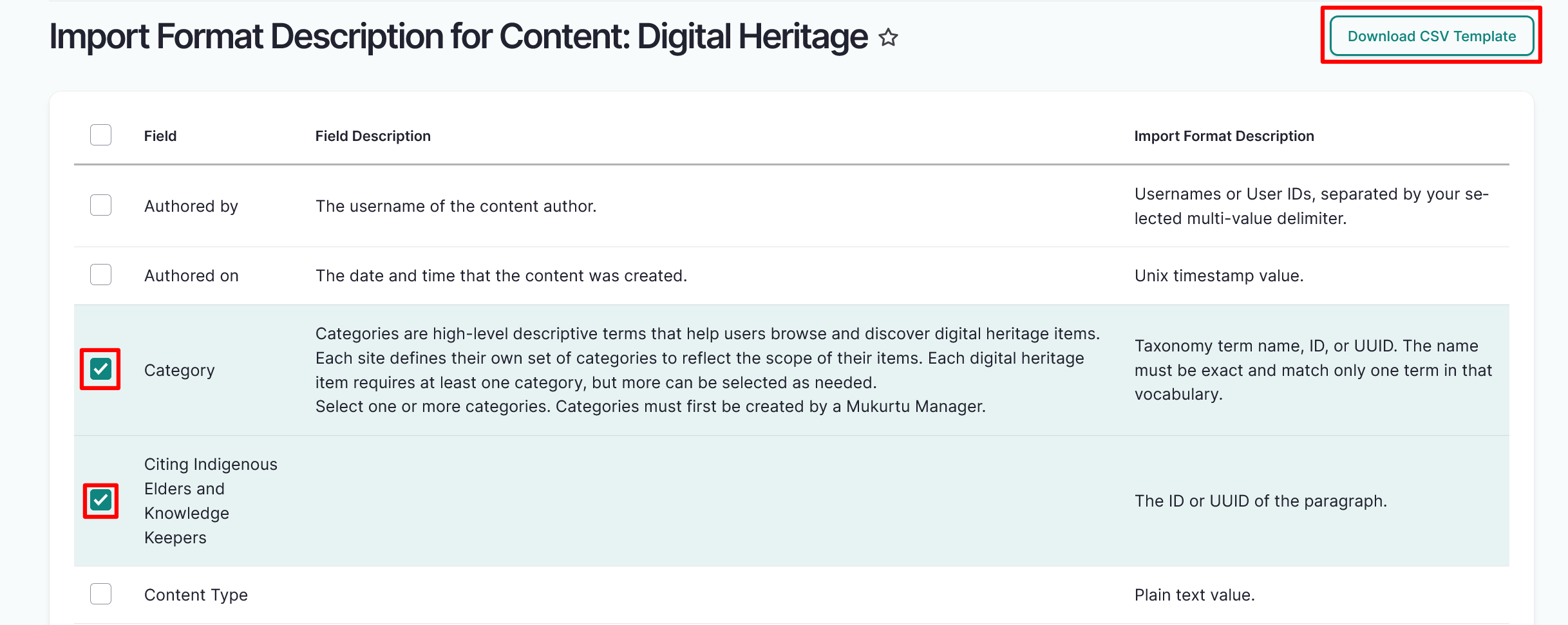
An auto-generated listing of all import types is available at /admin/import/format (linked on the dashboard as "Import format information").
This allows users to:
- Easily export a CSV template with the correct field headers for their site. They can choose which fields to include as well, to minimize confusion.
- View the formatting requirements for all fields in one place (eg: text, ID)
To download an import template, select the link for the content type, paragraph, or media asset type you want to import. Select the checkboxes to the left of the fields you want to include in your template, then select the "Download CSV Template" button to download your template.
Identifiers: Name, ID, UUID, Import ID
There are four kinds of identifiers that are used in various roundtrip tasks. A spreadsheet used in import should only ever include one of these identifier fields at a time.
- Name/Title/Term/Label
- All content will have a name, title, term, label, or other field, created by users.
- In many cases you can reference existing site content, or content within the same import by it's name instead of an abstract identifier. This requires that the names are unique. If names are not unique (eg: if two communities have protocols simply named "Public", you would need to refer to the public protocols by their ID instead.)
- When creating new content or uploading new media through an import, you can almost always rely on the name field instead of having to provide a separate identifier.
- Import ID
- Created by users for referencing across spreadsheets within the same import, for example connecting paragraphs to their parent content (like dictionary words and their word entries).
- They can be any text string and are intended to be easy to reference across sheets.
- They are not retained in the system after import.
- ID
- Assigned by the system when content, media, terms, etc, are created. Never created by users.
- These start at
1for each content/entity type and increase from there. Since each type of content starts numbering at1, these are not unique. For example, the first cultural protocol created on the site will have the ID 1, and the first digital heritage item created will also have the ID 1. The system uses the context of which field they are located in for referencing existing content/entities within the same site. - When using roundtrip to update existing site content you will usually want to use the ID field.
- UUID (universally unique identifier)
- Assigned by the system when content, media, terms, etc, are created. Rarely created by users.
- These are unique strings that are never repeated within the same site, and will likely never be repeated across any site ever (eg:
550e8400-e29b-41d4-a716-446655440000). - They are used to reference and identify content when sending information between the site and other sites/systems without risk of repetition.
This is unrelated to the Identifier metadata field present in most content and media assets which is descriptive and not structural.
"Authored by" field
All import sheets can include an optional Authored by field. This is used to indicate which user is responsible for creating the imported content. It can be useful to identify content authors and to track the revision history of content as it is changed.
- The Authored by field can reference any valid username.
- The user running the import MUST have correct protocol permissions for all content and protocols referenced in the sheet.
- If a user is listed as the author of content and later loses permission to access the content due to protocol membership changes, then they cannot access the content. Being the author of content does not bypass over override protocol access controls.
If no author is provided (if the field is empty, omitted entirely, or does not reference a valid username)
- The user running the import is listed as the author.
If an author with correct protocol permissions is provided, AND the user running the import has correct protocol permissions
- The user identified in the Authored by field is listed as the author.
If an author with correct protocol permissions is provided, BUT the user running the import does NOT have correct protocol permissions
- The import will fail with a community membership error. The user running the import MUST have correct protocol permissions.
If an author with INCORRECT protocol permissions is provided, BUT the user running the import DOES have correct protocol permissions
- The user running the import is listed as the author.
Draft field
At this time if draft field is present, all content must include a value in that field. If it is not required, omit the field entirely.
Paragraphs
Certain Mukurtu content types reference paragraphs as part of their metadata structure. Paragraphs are groups of fields that can be repeated within content allowing for more complex or nuanced content. Each type of paragraph is imported as a separate spreadsheet from it's corresponding content.
The stock content and paragraphs are:
| Content type | Paragraph |
|---|---|
| Digital heritage items | Citing Indigenous Elders and Knowledge Keepers |
| Dictionary words | Word entries Sample sentences |
| Word entries* | Sample sentences |
| Person records | Related people Biography (text) sections |
| Place records | Text sections |
*Word entries are paragraphs, not content types, but they can also include sample sentence paragraphs
Importing content and related paragraphs at the same time
When including both a content spreadsheet and a related paragraph spreadsheet in the same import (eg: dictionary words and sample sentences):
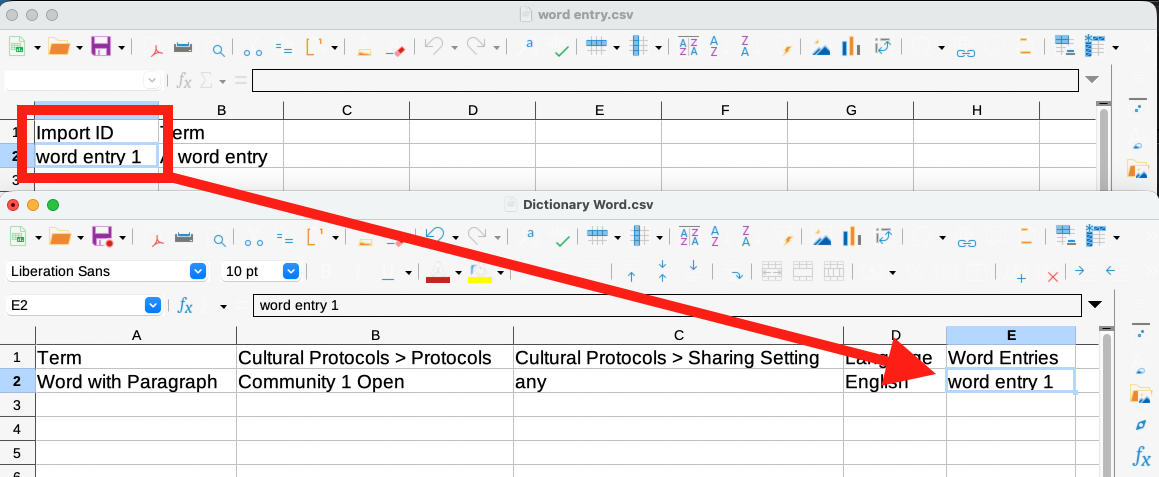
- In the paragraph spreadsheet, include an Import ID field (you can name it whatever you like). This is not the same as the regular ID or UUID field, it is a field that is ONLY used to connect the content during import and is not retained in the database.
- Assign each paragraph an identifier in that field. These identifiers can be anything that is easy to view and reference in the corresponding content spreadsheet.
- In the content spreadsheet, in the appropriate paragraph field, reference the paragraphs by their Import ID identifiers, separating multiple paragraphs with semicolons.
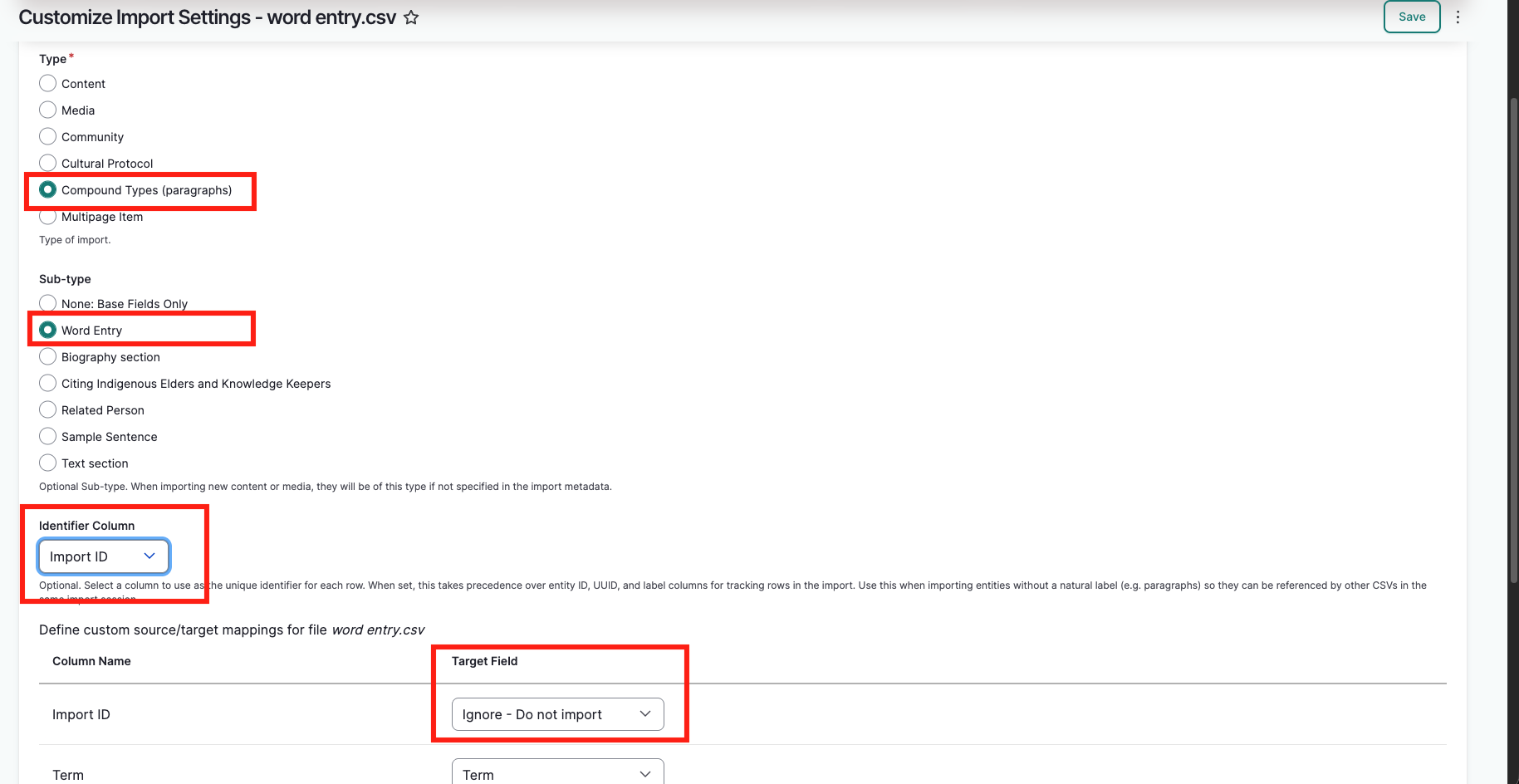
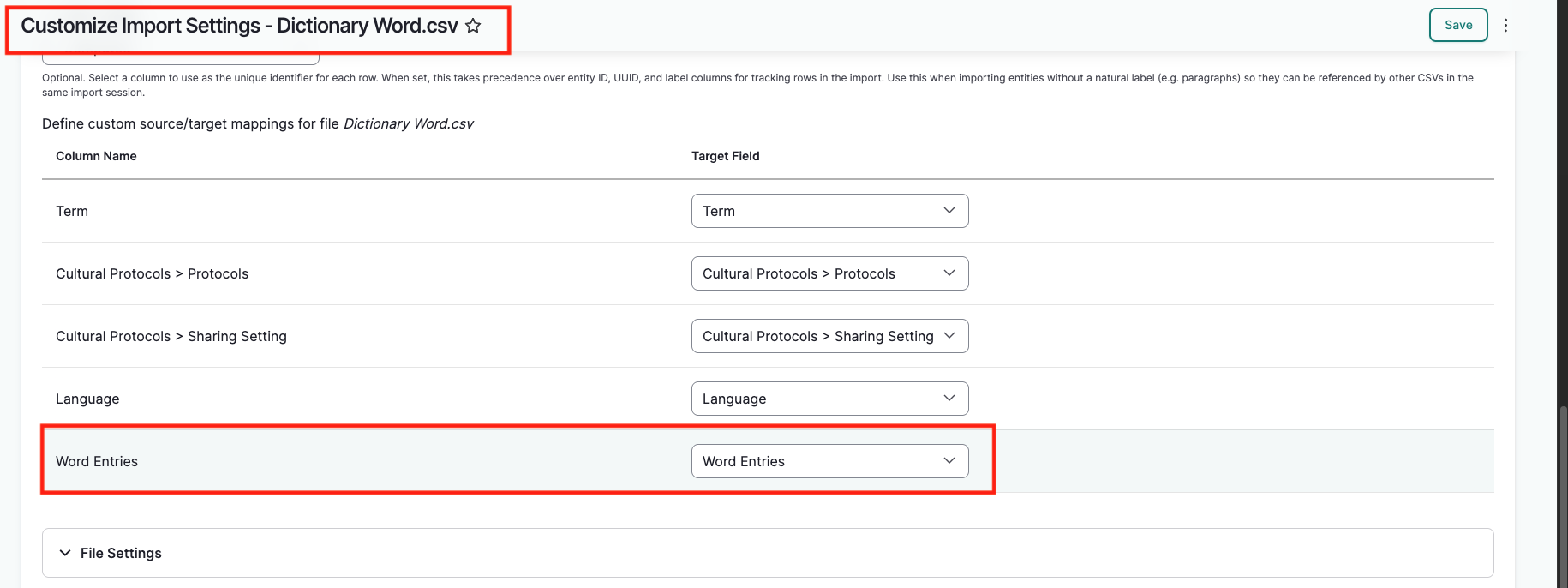
- When mapping the paragraph import settings:
- In the Identifier Column setting, select the Import ID field.
- In the field mapping table, confirm that the Import ID field is set to "Ignore - Do not import".
- When mapping the content spreadsheet, confirm that the paragraph reference field is mapped correctly.
This will allow the system to stage the paragraphs and then connect them to the appropriate content on import.
The screenshots below show a dictionary word and corresponding word entry as an example.
Importing paragraphs and adding them to existing content
The process is largely the same as importing content and related paragraphs at the same time.
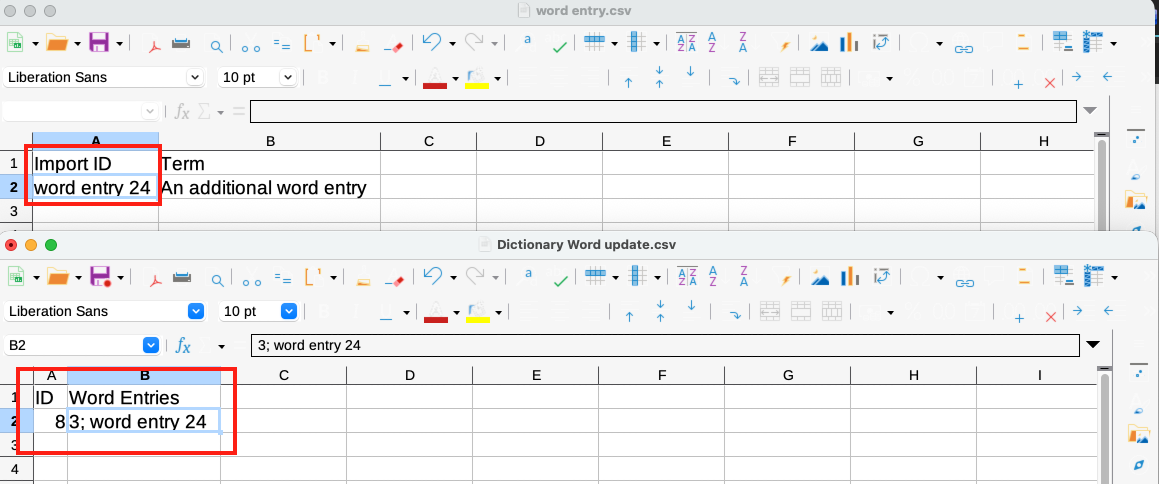
- The primary difference is that the content spreadsheet ONLY needs to include the ID or UUID field, and the paragraph reference field (unless other edits are being made at the same time).
- If the content already has a paragraph referenced and more paragraphs are being added, then the ID/UUID/Import ID for ALL paragraphs must be included.